New paradigm · April 2026

Your app
should learn
while you work.

Most apps are built once and stay frozen. What if yours got better every time you used it — automatically, without code changes, without retraining a model?

The Opportunity

Claude Code and Codex are no longer just for developers. They are becoming the most capable tools for any kind of work that depends on human judgment — and anyone in the business can put them to work.

Research, document review, lead qualification, onboarding, reporting, compliance, creative work. Any process where a person has to read something, make a decision, and take the next step is a natural fit.

Skills make this practical. Skills are sets of instructions that teach the AI how to behave in a specific task or industry — turning a general model into something consistent and reliable for your company.

In plain terms, Skills are playbooks for AI. They show it how to handle real work, in real companies, at real scale.

Why not just
use Claude Code?

Claude Code and Codex are brilliant engines — but handed straight to a business user, two things get in the way.

Limitation 01

A chat window isn't a business tool

Real work needs forms, dashboards, review flows, audit trails, and multi-user access — not a blinking prompt. Most processes can't be done in a terminal. The AI is ready; the shell it lives in is holding it back.

Limitation 02

It doesn't learn from your team

Every session starts fresh. Corrections you made yesterday are gone today. The AI repeats the same mistakes, and there's no natural place for your company's knowledge to accumulate between runs.

Claude Code · raw chat
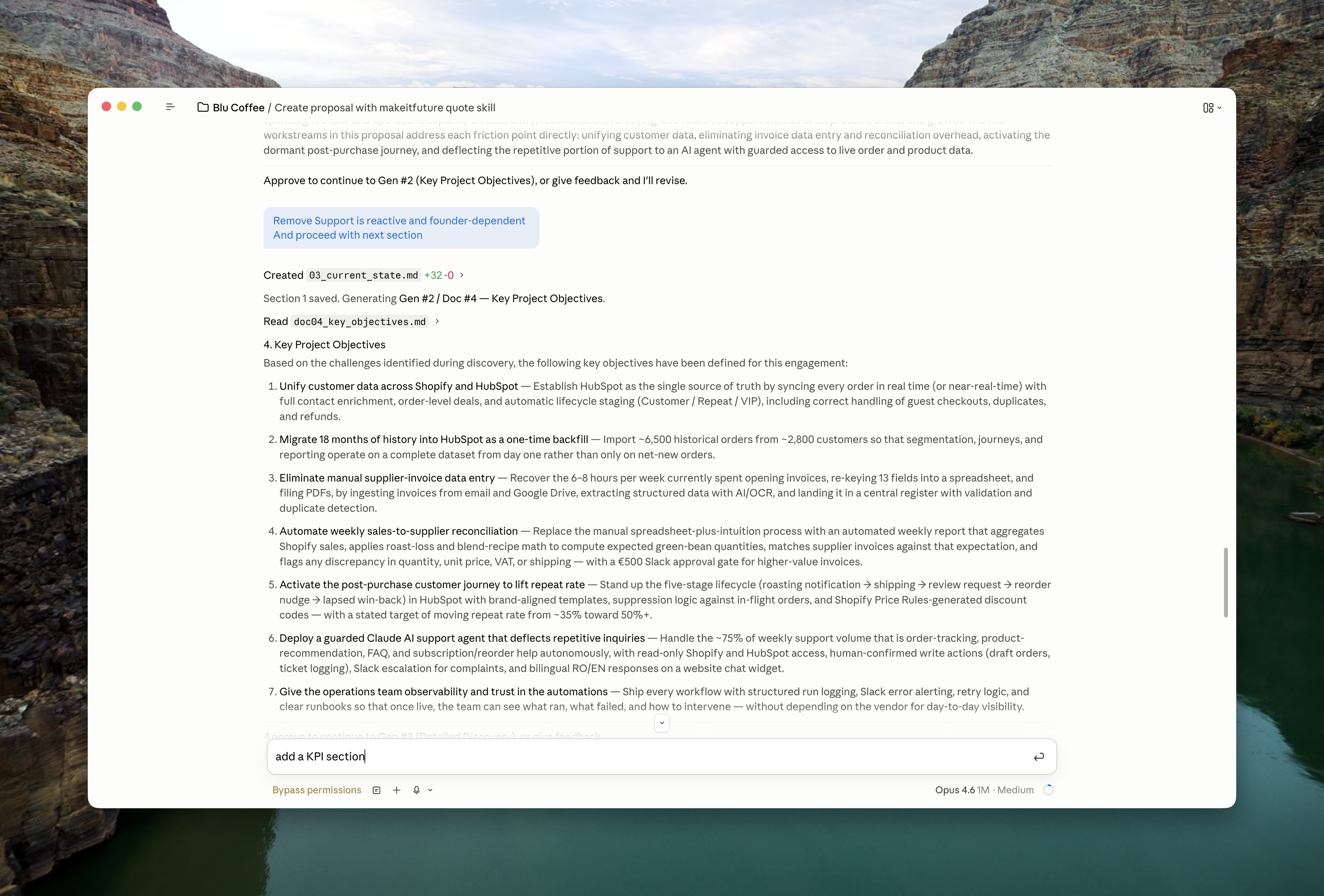
Drafting a proposal in the Claude Code chat interface — a long, scrolling conversation with the model.
One scrolling chat. No section nav, no per-block feedback, no audit trail. The work is there — but you can't operate it as a business process.
Self-evolving app · headless Claude Code
The same proposal task running inside the Proposal Generator app: section navigation, structured content, inline feedback box and an Approve button.
Same Claude Code in the background — wrapped in a real app. Section navigation, structured drafts, inline feedback, approve flow, memory of every correction.
Introducing

Self-Evolving Apps are web or native applications built on top of Claude Code or Codex — where the AI reasoning layer lives completely outside the app shell, and improves automatically over time.

The app handles the interface, the data, and the user experience. Claude handles the thinking, the matching, the decisions. They communicate through a shared folder — a structured contract that neither side breaks.

Every user correction feeds back as a future example. Every skill update takes effect immediately. The app you ship today is smarter than the one you shipped last week — without a new release.

Your app · contract review
Uploaded
Acme_MSA_v3.pdf
Non-standard clauses3 flagged
Risk scoreMedium
Suggested redlinesStreaming…
Claude Code · subprocess
reading SKILL.md
loading corrections.json (142 past reviews)
thinking: compare clauses to policy…
tool: grep policy.md "indemnification"
streaming result → app
tokens 2,310 · $0.014
>
Built for Every Industry

Any process that involves reading, deciding, and acting is a candidate. Here are examples across common business functions — but if your process requires judgment, it fits.

💼
Sales
  • Quotation Generator

    Reads deal context and generates tailored quotes with correct pricing, conditions, and terms.

  • SDR Follow-up Agent

    Reviews CRM activity and drafts personalised follow-up sequences based on deal stage and history.

  • Proposal Builder

    Assembles full sales proposals from a brief — scope, pricing, timeline, and differentiation.

  • Pipeline Health Report

    Analyses deal pipeline data and flags at-risk opportunities with recommended next actions.

⚖️
Legal
  • Contract Generator

    Creates first-draft contracts from a brief — NDA, MSA, SoW — using company-approved templates and language.

  • Contract Review

    Reads incoming contracts, highlights non-standard clauses, flags risk, and proposes redlines.

  • NDA Screening

    Checks NDAs against a policy checklist and returns a pass/flag/reject with reasoning.

  • Compliance Checker

    Reviews internal documents or processes against regulatory requirements and outputs a gap report.

⚙️
Operations
  • Project Review Assistant

    Reads project updates, status logs, and timelines to produce a concise health summary with risk flags.

  • Time Tracking Analyser

    Processes time logs and surfaces utilisation patterns, budget overruns, and team allocation issues.

  • Process Audit Tool

    Maps an existing workflow against a standard operating procedure and identifies gaps or inefficiencies.

  • Resource Allocation Report

    Analyses team capacity and workload data to recommend project staffing adjustments.

🧾
Admin & Finance
  • Invoice Generator

    Converts completed project data into formatted invoices with correct line items, taxes, and payment terms.

  • Reconciliation Agent

    Compares transaction records across systems, flags discrepancies, and produces a reconciliation report.

  • Expense Report Automation

    Reads receipts and categorises expenses against policy, flagging out-of-policy items before submission.

  • Budget vs Actual Analysis

    Pulls financial data and generates a commentary-style variance report ready for leadership review.

🧑‍💼
HR & People
  • CV Screening Assistant

    Reads applications against a job brief and scores each candidate with a structured shortlist rationale.

  • Onboarding Workflow

    Guides new hires through documentation, policy reading, and task completion with AI-assisted Q&A.

  • Performance Review Summariser

    Reads self-assessments, manager notes, and goal data to draft structured review summaries.

  • Job Description Generator

    Turns a role brief into a polished, inclusive job description aligned to company tone and level standards.

📣
Marketing & Support
  • Content Brief Generator

    Takes a topic and audience brief and produces a structured content brief with angle, outline, and key messages.

  • Campaign Performance Analyst

    Reads campaign data and generates a narrative performance report with insights and next-step recommendations.

  • Support Ticket Triage

    Classifies incoming support tickets by urgency, topic, and required skill, then routes or drafts a first response.

  • Knowledge Base Q&A

    Answers customer questions using company documentation, escalating automatically when confidence is low.

Don't see your use case? If your process involves reading information, applying judgment, and producing an output — it can be built as a self-evolving app.

The Learning Loop
01

Claude processes your data

The app passes input files to Claude. Claude reads the skill instructions, loads domain knowledge, and produces a structured result — streamed live to the UI.

02

You review the results

The app parses result.json and shows Claude's decisions in a review interface. Most answers are correct. A few need correction.

03

You correct what's wrong

You change the wrong answer to the right one. The app saves the correction: which signals were present, what Claude thought, and what the correct answer was.

04

Corrections become examples

corrections.json grows. The skill instructs Claude: "Read this file before reasoning. If you see similar signals, use these past answers as authoritative examples."

05

Next run is more accurate

No model retraining. No data science. Just a casebook that grows with every session — and an AI that reads it before every decision.

0
ML infrastructure required
No fine-tuning, no vector databases, no training pipelines. The self-evolving mechanism is a JSON file and a SKILL.md instruction to read it.
Skill updates, zero app releases
Improve the AI's reasoning, rules, and domain knowledge independently — while the app and its users see improvements on the next run.
Accuracy grows with usage
Every correction is an example the AI never forgets. The more the app is used, the less it needs to be corrected. The loop tightens automatically.
What agentic system
can you use?

Claude Code, Gemini CLI, Codex, and Copilot CLI are the most capable agentic systems available today. They're not the same product — but they share the same fundamental shift: the AI doesn't just generate text, it acts.

What they all share
  • Advanced reasoning & extended thinking modes
  • MCP & tool-use — connect any API or data source
  • CLI-first design — scriptable, automatable, composable
  • Native code execution in sandboxed environments
  • Subagent orchestration — agents spawning agents
  • Continuous improvement — all developing at incredible speed
Which one should you use?

It really depends on your company policies and existing licenses. The good news: self-evolving apps work with any of them. The agentic system is swappable — your skills, memory, and architecture stay the same.

Feature Comparison
Feature Claude Code Codex CLI Gemini CLI Copilot CLI
Skills ✅ Markdown skill files ✅ AGENTS.md + custom commands ✅ Agent Skills (.md) ✅ Shared with cloud agent & VS Code
Subagents ✅ Isolated context, custom prompts & tools ✅ Roles via config.toml + git worktrees ✅ Custom agents in .gemini/agents/ ✅ Built-in + custom .agent.md files
Parallel Agents ✅ Agent Teams with direct messaging ✅ Parallel worktrees + Agents SDK ⚠️ Experimental ✅ /fleet + multiple sessions
MCP Support ✅ Native (stdio, SSE) ✅ stdio + streaming HTTP; can act as MCP server ✅ Native (stdio, http, sse) ✅ GitHub MCP built-in + custom
Headless Run ✅ -p flag ✅ codex exec (dedicated mode) ✅ gemini -p "prompt" ✅ -p / --prompt flag
Streaming / JSON ✅ JSON + stdout streaming ✅ JSONL stream + --output-schema ✅ --output-format stream-json ✅ --output-format=json JSONL
Open Source ❌ No ✅ Apache 2.0 (Rust) ✅ Apache 2.0 ❌ No
Multi-Model ❌ Anthropic only ⚠️ OpenAI only (+ local Ollama) ❌ Google only ✅ Anthropic + OpenAI + Google
See full comparison →
Licensing Models

Not all authentication methods are created equal. Whether you're building for yourself, your team, or external customers — the rules differ significantly across Claude Code, Codex CLI, Gemini CLI, and Copilot CLI. Understanding this upfront saves you from costly architecture decisions later.

Covers personal use, VPS deployment, CI/CD, centralized servers, and commercial product scenarios — with a full breakdown of what's allowed per auth method and vendor.

View Licensing Details →
How It Works
User Layer

App Shell — Web or Native

The app manages the UI, prepares data files, stores corrections, and renders results. It has no embedded intelligence — it is deliberately dumb. Language: Node.js + Express (web) or Swift + SwiftUI (macOS).

Vanilla JS / SwiftUI File I/O Subprocess runner Corrections store Token tracking
reads & writes files ↕
Contract Layer

Working Directory — The Briefing Room

The only shared space between the app and Claude. The app prepares it before each run. Claude walks in, reads everything, and leaves a structured answer. Neither side knows about the other's implementation — they only share this folder.

input.json result.json CLAUDE.md references/.env corrections.json skill symlinks
cwd = working directory ↕
AI Layer

Claude Code / Codex Subprocess

Spawned by the app per session or kept alive between messages. Reads CLAUDE.md for instructions, credentials from .env, corrections.json for past examples. Streams thinking, tool calls, and text deltas back to the app. Writes structured output to result.json.

stream-json --verbose AsyncStream events Tool calls logged Token + cost tracking
skill is a symlink ↕
Intelligence Layer

Skill — The Updatable Brain

A folder containing SKILL.md (instructions), Python scripts (preprocessing), and reference documents (domain knowledge, matching rules). Symlinked into four locations so Claude finds it from any context. Update the skill — the next run is smarter. The app never changes.

SKILL.md scripts/*.py references/*.md 4× symlinked Zero-downtime updates
Technical Foundation

For builders who want to understand the implementation. Every pattern is production-tested in a real daily-use application.

Read the Docs →
📡

Streaming — NDJSON & AsyncStream

Claude streams events line by line. Web apps read via HTTP chunked fetch. Native apps use Swift AsyncStream<ClaudeEvent> — a typed enum covering thinking, toolUse, textDelta, done, and tokenUsage. Every event is rendered live.

🔐

Credentials — references/.env

All API keys live in references/.env inside the working directory. The app reads and writes this file. Claude reads it directly when calling external APIs. No hardcoded secrets. No app-specific credential stores.

🔗

Skill Symlinks — 4 Locations

Every skill is symlinked into ~/.claude/skills/, ~/.agents/skills/, ~/workdir/.claude/skills/, and ~/workdir/.agents/skills/. All four point to the same real directory. Update once, all contexts update instantly.

📊

Token & Cost Tracking

Every run captures input tokens, output tokens, cache read tokens, and total cost in USD from Claude's result event. Displayed after every session. Users always know what processing costs.

📄

Structured Output Contract

Claude never returns freeform text as primary output. Every run ends with a structured JSON envelope: {"message":"...","results":[...]}. The schema is the only hard coupling between app and skill. Change the skill freely — keep the schema stable.

Persistent Session (Native)

Native apps keep one Claude process alive per session via stdin/stdout — eliminating per-message startup delay. Web apps spawn per message. Both patterns supported. Both share the same working directory and skill architecture.

The File Contract
APP writes input files + references/.env before each run
APP writes CLAUDE.md on every launch — sources the latest skill content
APP appends corrections to corrections.json when user overrides AI
SKILL reads CLAUDE.md → credentials → corrections → input files
SKILL reasons, runs scripts, calls APIs → writes result.json
APP reads result.json → parses to domain model → renders UI
BOTH agree on result.json schema — the only hard coupling
Two Platforms. One Architecture.
🌐

Web App

Node.js + Express + Vanilla JS
  • Browser UI — HTML, CSS, no framework, no build step
  • Chat-first layout — controls left, AI chat right
  • NDJSON streaming via HTTP chunked fetch
  • New Claude process per message
  • Deployable to Railway, Docker, any server
  • Skills in skills/ dir, symlinked into workdir
  • Session continuity via --session-id / -r flags
  • Best for: team tools, dashboards, quick prototypes
🍎

Native macOS

Swift + SwiftUI + XcodeGen
  • Native SwiftUI — menus, notifications, system integration
  • Typed AsyncStream<ClaudeEvent> enum — no JSON in view layer
  • Persistent process — no startup delay between messages
  • Skills deployed from app bundle via SkillManager
  • CLAUDE.md + AGENTS.md rewritten on every launch
  • Credentials via EnvStore — reads references/.env
  • Screenpipe integration for passive activity capture
  • Best for: power users, daily workflows, offline-first tools
Ready to build
a self-evolving app?

We're sharing the architecture, the patterns, and the lessons from building in production. If you're building AI tools that need to go beyond the chat window — let's talk.

Book a Call with Me
Let's talk
Tiberiu Socaci
Founder · Self-Evolving Apps
Architecture consulting for AI apps
Self-evolving app implementation
Agentic system selection & licensing review
Production deployment & skills design
Book a Free Call →
Open Source Skill
Want to build it yourself?

The full headless app creator skill — production-tested patterns, architecture decisions, and ready-to-use code — packaged and ready to drop into your own Claude Code setup.

Read the Docs →
📡
NDJSON Streaming Protocol
Complete backend + frontend streaming pattern. Event types, error recovery, active-run guard.
🧠
Skills & Subagent System
SKILL.md schema, working folder isolation, symlink setup, and agent.md patterns.
🚀
Docker & Railway Deployment
Production-ready Dockerfile, package.json, and environment setup. No build step.
💬
Chat-First UI Patterns
Activity pill, optimistic messages, multi-view SPA, session resume, drag & drop upload.
Frequently Asked Questions
What is a self-evolving app? +
A self-evolving app is a web or native application where the AI reasoning layer lives completely outside the app shell. Built on top of Claude Code, Codex CLI, Gemini CLI, or Copilot CLI, the AI improves its own skills and decision-making automatically over time — without any app releases or developer intervention.
Do I need a developer to build a self-evolving app? +
Setting up the initial architecture — Node.js server, Express routes, Claude CLI subprocess — requires development capability. But once the shell is built, updating the AI's skills, domain knowledge, and reasoning rules requires no coding at all. We can build the full architecture as a consulting engagement, or provide the downloadable skill and documentation for your team to implement it themselves.
Talk to us about your project →
What kind of apps can you build with this pattern? +
Any domain process that currently involves human judgment is a candidate. Real examples include: contract review and analysis tools, customer support agents with persistent domain memory, sales enablement apps that learn company pitch patterns, HR screening assistants, financial report generators, and custom CRM automations. The pattern works for both web apps (Node.js + Express) and native desktop apps (Swift/macOS). If it involves reading, deciding, and responding — it's a fit.
What is the difference between a self-evolving app and a traditional AI chatbot? +
A traditional AI chatbot sends user messages to an API and returns a response. A self-evolving app goes further: it maintains persistent skills (domain expertise encoded in SKILL.md files), accumulates corrections in a structured format, uses subagents to delegate tasks, executes real actions via MCP tools, and improves its own reasoning rules over time — all without any developer intervention after deployment.
What is a CLI tool — and do my users ever see one? +
CLI stands for Command-Line Interface — a text-based way to run software by typing commands into a terminal. Claude Code, Codex CLI, Gemini CLI, and Copilot CLI are all AI tools that run in a terminal. In a self-evolving app, the CLI runs silently in the background, driven by your server. Your users never see a terminal — they use your app's normal interface (buttons, forms, chat). The CLI is the engine; your app is the dashboard.
Can I build an app on top of Claude Code? +
Yes. Claude Code supports headless mode via the -p flag, letting you spawn it as a subprocess from a Node.js server. This enables you to build full web applications, automations, and SaaS tools with Claude as the AI reasoning engine. The same pattern works with Codex CLI (codex exec) and Gemini CLI (gemini -p).
Read the full architecture guide →
Which is better — Claude Code, Codex CLI, Gemini CLI, or Copilot CLI? +
It depends on your company policies and existing licenses. Claude Code has the most mature subagent system. Codex CLI is best for CI/CD and is open source. Gemini CLI has the largest context window (1M tokens) and the most generous free tier. Copilot CLI is the only multi-model tool (Anthropic + OpenAI + Google). Self-evolving apps work with any of them — the agentic system is swappable.
See the full feature comparison →
Do self-evolving apps require machine learning infrastructure? +
No. Zero ML infrastructure is required. No fine-tuning, no vector databases, no training pipelines. The self-evolving mechanism is a JSON corrections file and a SKILL.md instruction that tells Claude to read it. Every correction becomes a permanent example the AI applies on every future run.
How is this different from calling the Claude API directly? +
Calling the Claude API gives you a stateless text response — no persistent memory, no file access, no tool use, no self-improvement. A self-evolving app built on Claude Code adds all of that: persistent skills that encode domain expertise, a corrections loop so the AI learns from mistakes, subagents for parallel complex tasks, MCP tool connections to any API or database, real-time streaming, and session isolation. The API is a raw capability. Claude Code is a full reasoning engine — and the self-evolving pattern is the shell that makes it production-worthy.
Can I use a Claude subscription to build a product for external customers? +
No — for external products, you must use an API key. Anthropic's consumer subscription is restricted to "ordinary, individual usage." For a centralized server serving multiple users or any external commercial product, the Anthropic Commercial Terms require API key authentication. The same rule applies to Gemini CLI and GitHub Copilot CLI. Codex CLI is the only tool where OpenAI actively endorses individual users using their own subscription in third-party tools.
Read the full licensing guide →
Who built this? +
Self-Evolving Apps is an AI implementation project founded by Tiberiu Socaci, focused on helping businesses build production-ready AI-powered products. The team specialises in self-evolving app architecture, Claude Code and Codex CLI integrations, headless AI backends, and AI skills design for business processes. The self-evolving apps pattern was developed and battle-tested through real client projects before being documented and published here.