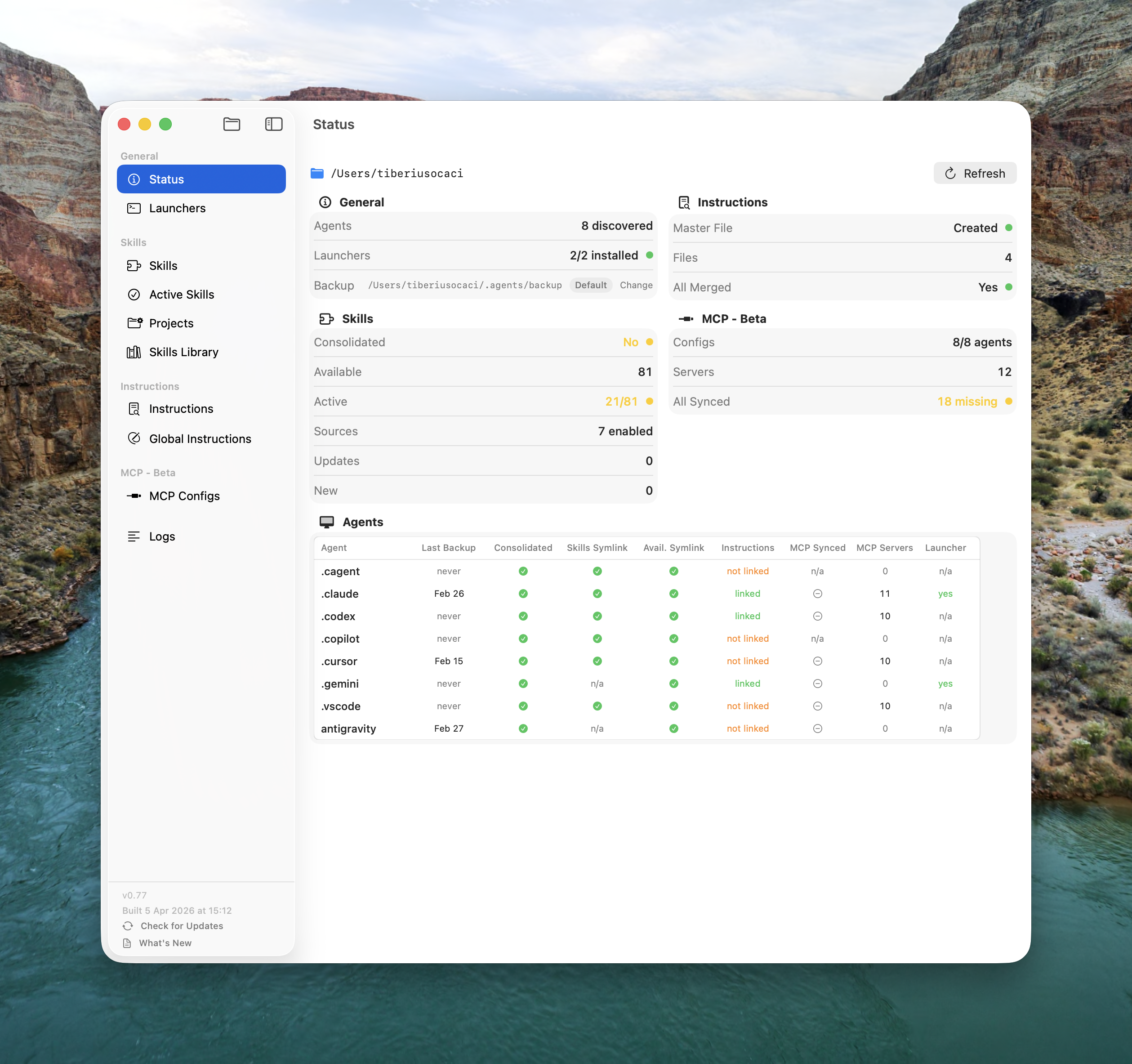
You use Claude Code, Cursor, Gemini, Windsurf and more — each with its own skills, instruction files, and MCP servers. The same configuration lives in 10+ directories. This app keeps all of them in sync.
Modern developers use multiple AI coding agents simultaneously — Claude Code, Gemini CLI, Cursor, Windsurf, Copilot, Codex, Cline, and more. Each has its own config directory, its own skills folder, its own instruction files (CLAUDE.md, .cursorrules, .windsurfrules), and its own MCP server config.
You add a skill to Claude Code — Cursor doesn't have it. You configure an MCP server in ~/.claude.json — it doesn't exist in ~/.cursor/mcp.json. You update your .cursorrules — your CLAUDE.md still says the old thing. Every agent is its own island.
And there's a performance problem: loading too many skills into an agent's context wastes tokens, causes false triggers, and slows responses — but without tooling, there's no easy way to control which skills are active and which aren't.
.md file drifts out of sync, leading to inconsistent behavior.
The app treats ~/.agents/available_skills/ as the single source of truth. Every agent's skills/ directory is a symlink pointing here. Add a skill once — every agent sees it. Update a skill once — every agent gets the update. No file copying. No version drift.
Your complete collection of skills. Every skill you've ever installed lives here as a real folder. Think of it as your bookshelf: every book you own, whether you're currently reading it or not. Skills accumulate here and are never deleted during normal operations.
Contains only symlinks pointing back to available_skills/. Each symlink means "this skill is currently active." Agents read only from here — so only the skills you've explicitly activated are visible. You might have 80 in the library, but only 10 loaded.
Everything you need to manage a multi-agent setup — from a single dashboard to per-project skill activation.
A single-screen health check of your entire multi-agent setup. One glance tells you if anything is out of sync across all 25+ agents.
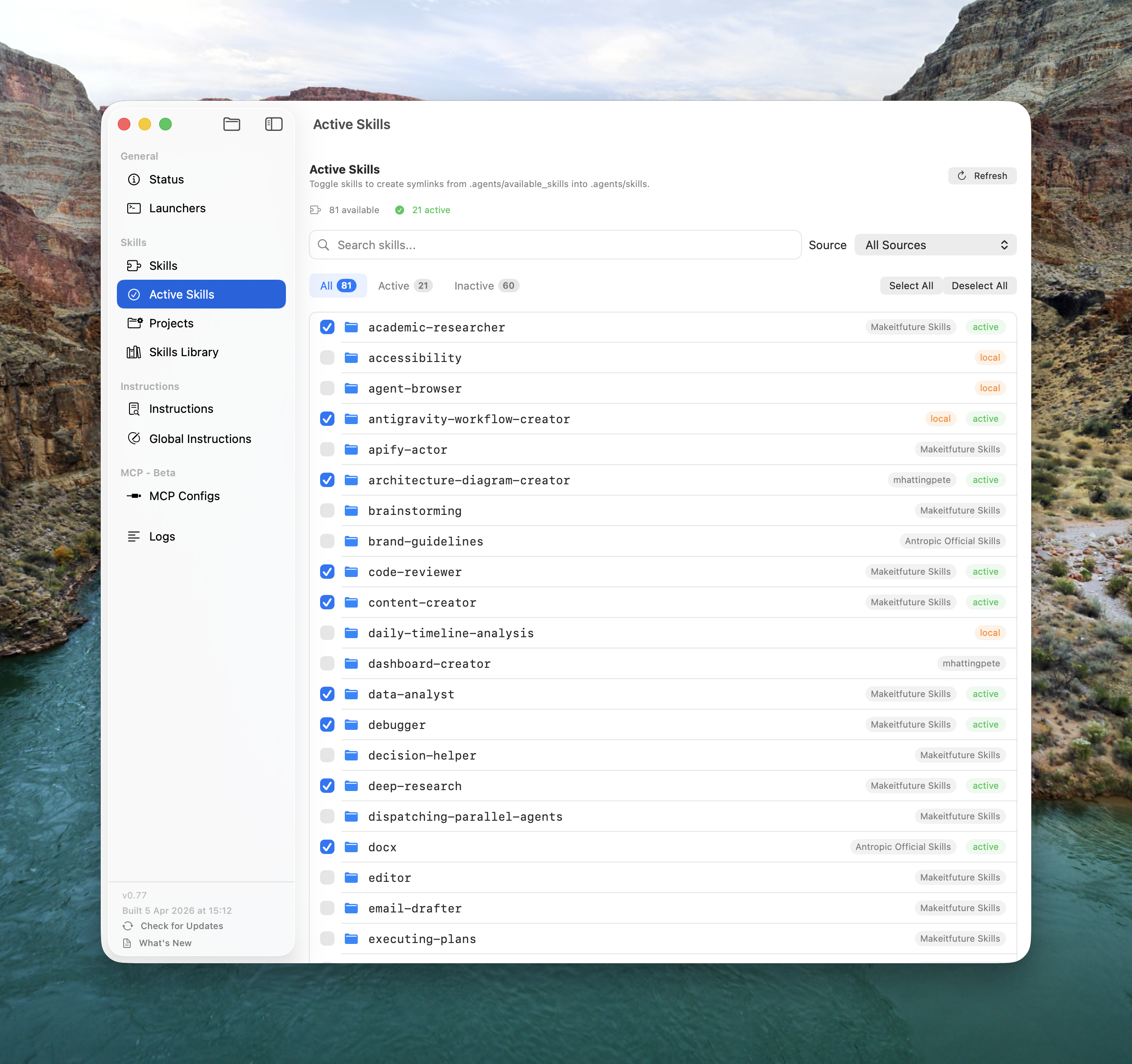
A checkbox list of every skill in your library with one-click activate/deactivate. Keep 5–15 skills active. Keep the rest available for when you need them.
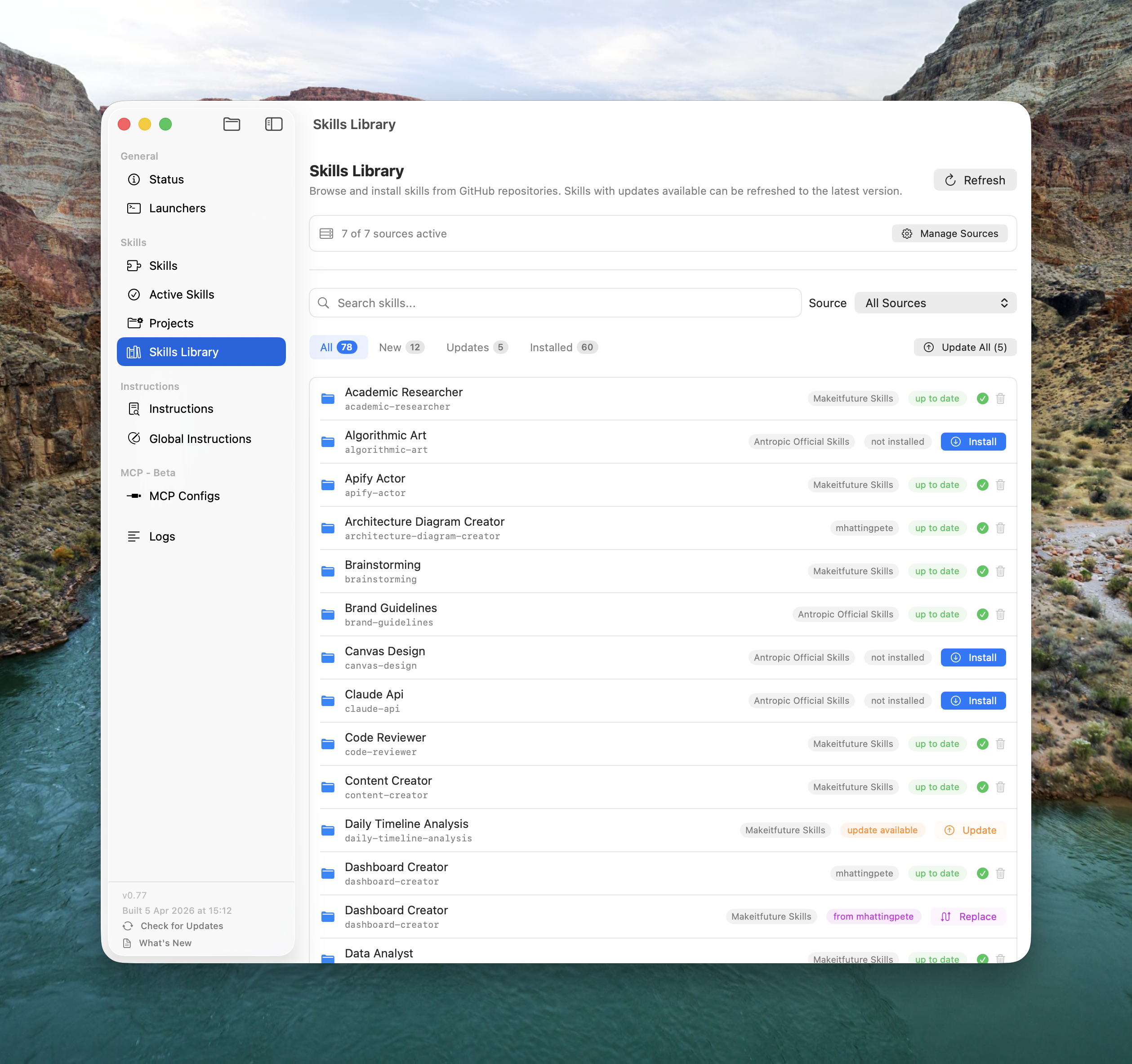
An App Store-like experience for AI agent skills, backed by GitHub repositories. Your team publishes skills — every developer's manager shows new and updated skills in one click.
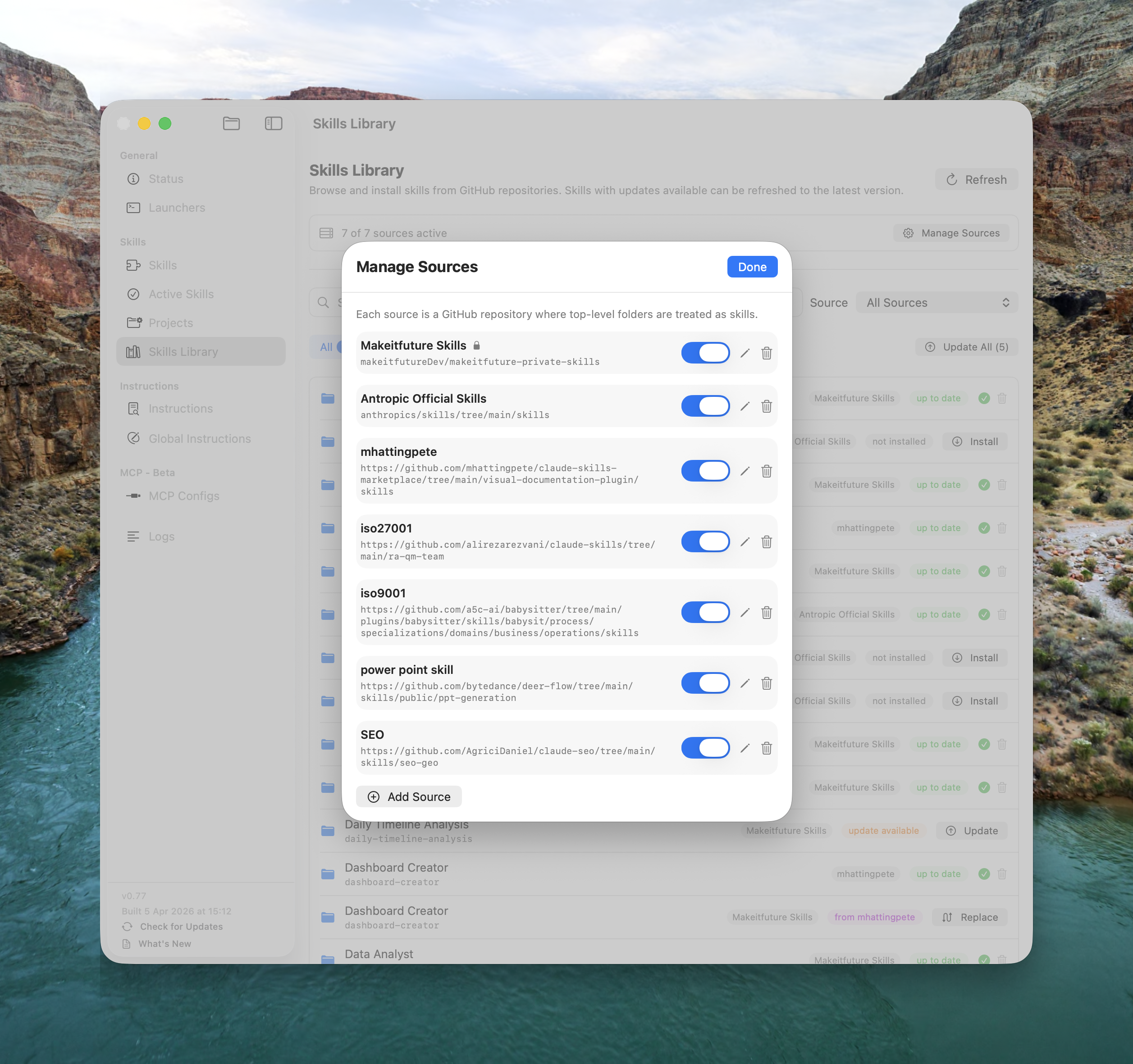
Configure one or more GitHub repositories as skill sources. Supports full repo paths, subdirectories, and single-skill URLs. Private repos with token support.
owner/repo, owner/repo/path, full GitHub URLs
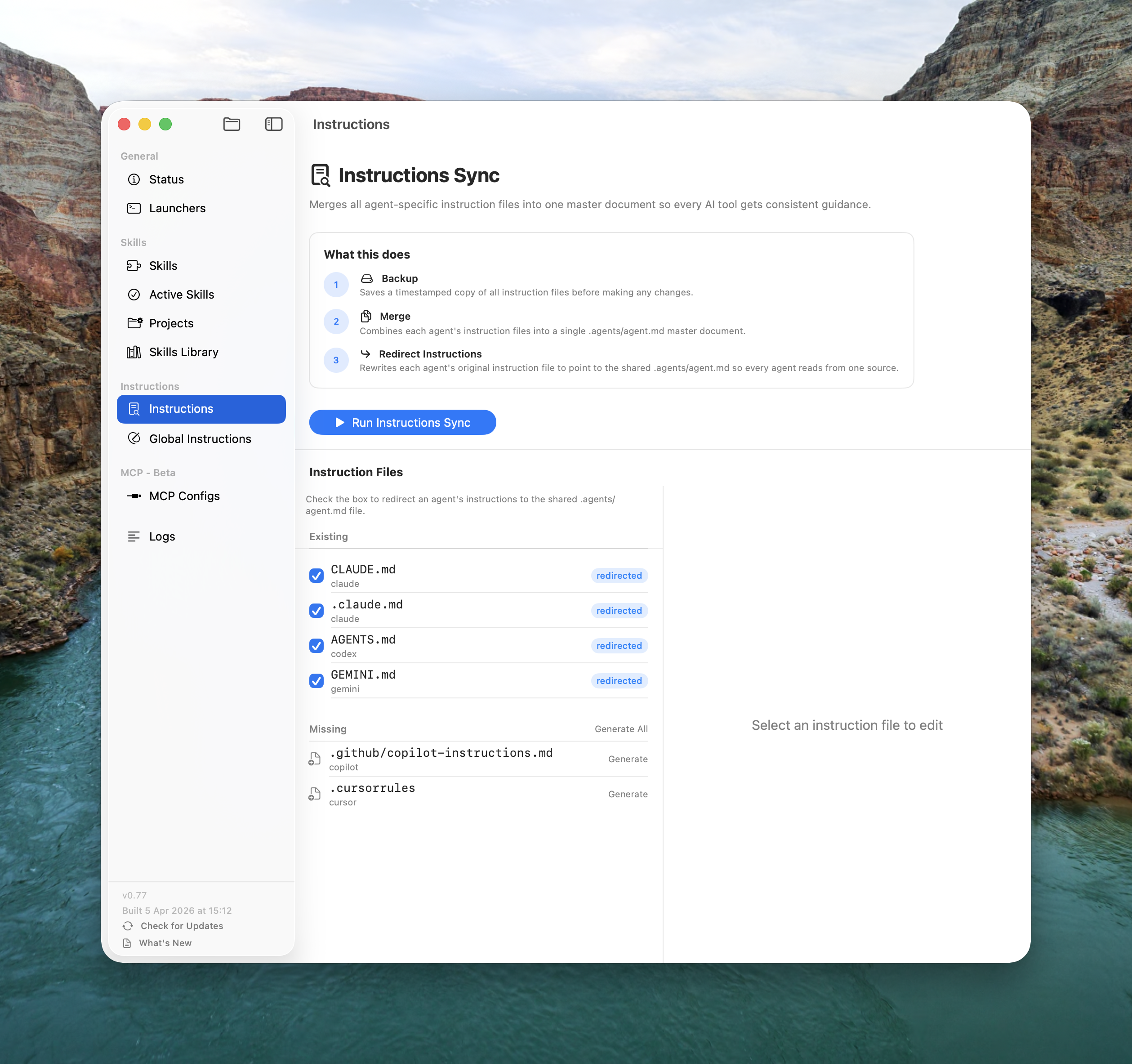
Consolidates all agent-specific instruction files into one master document. Write your instructions once — every AI agent reads the same guidelines.
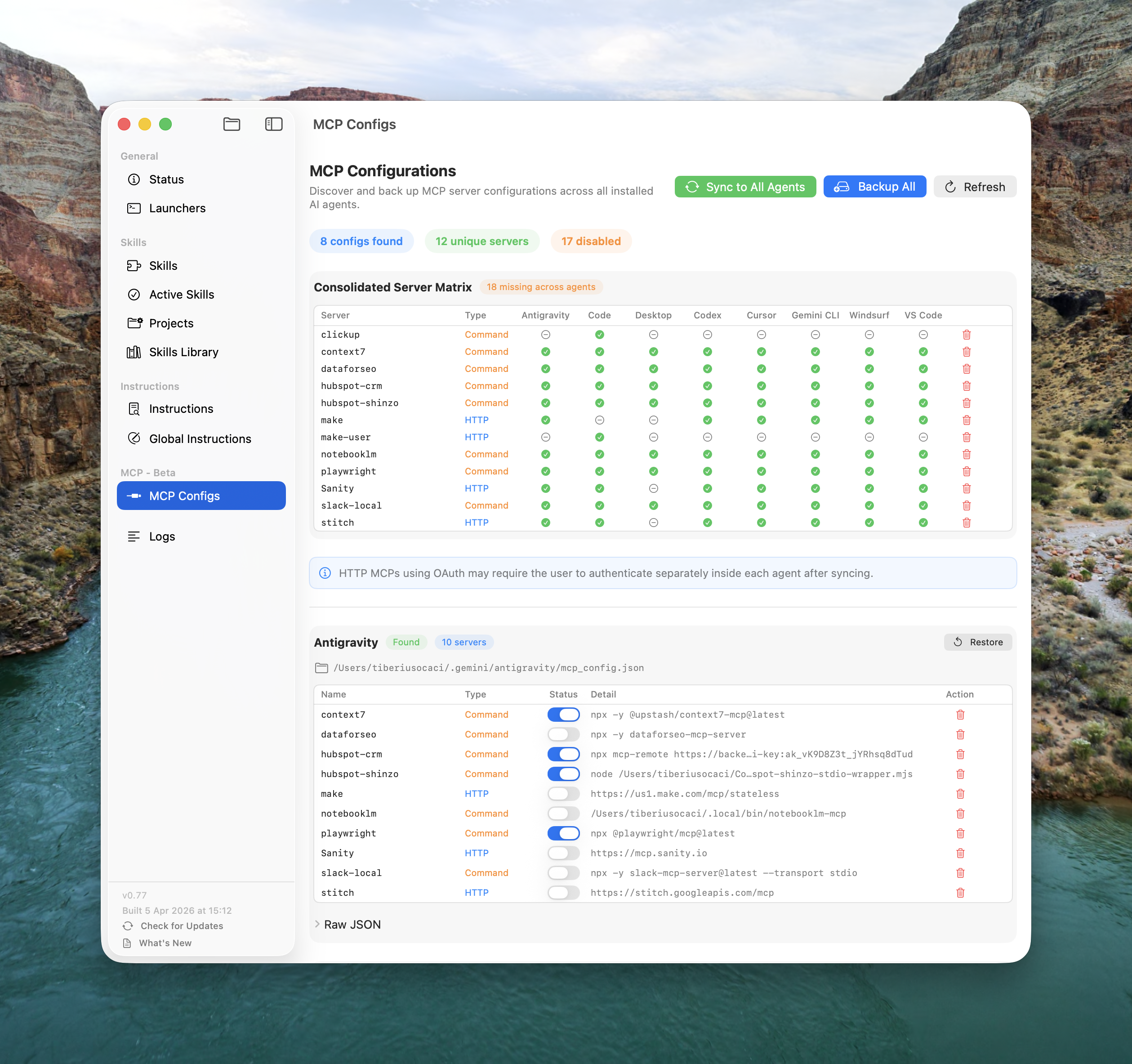
A unified view and sync tool for Model Context Protocol server configurations across all agents. Configure once, sync everywhere.
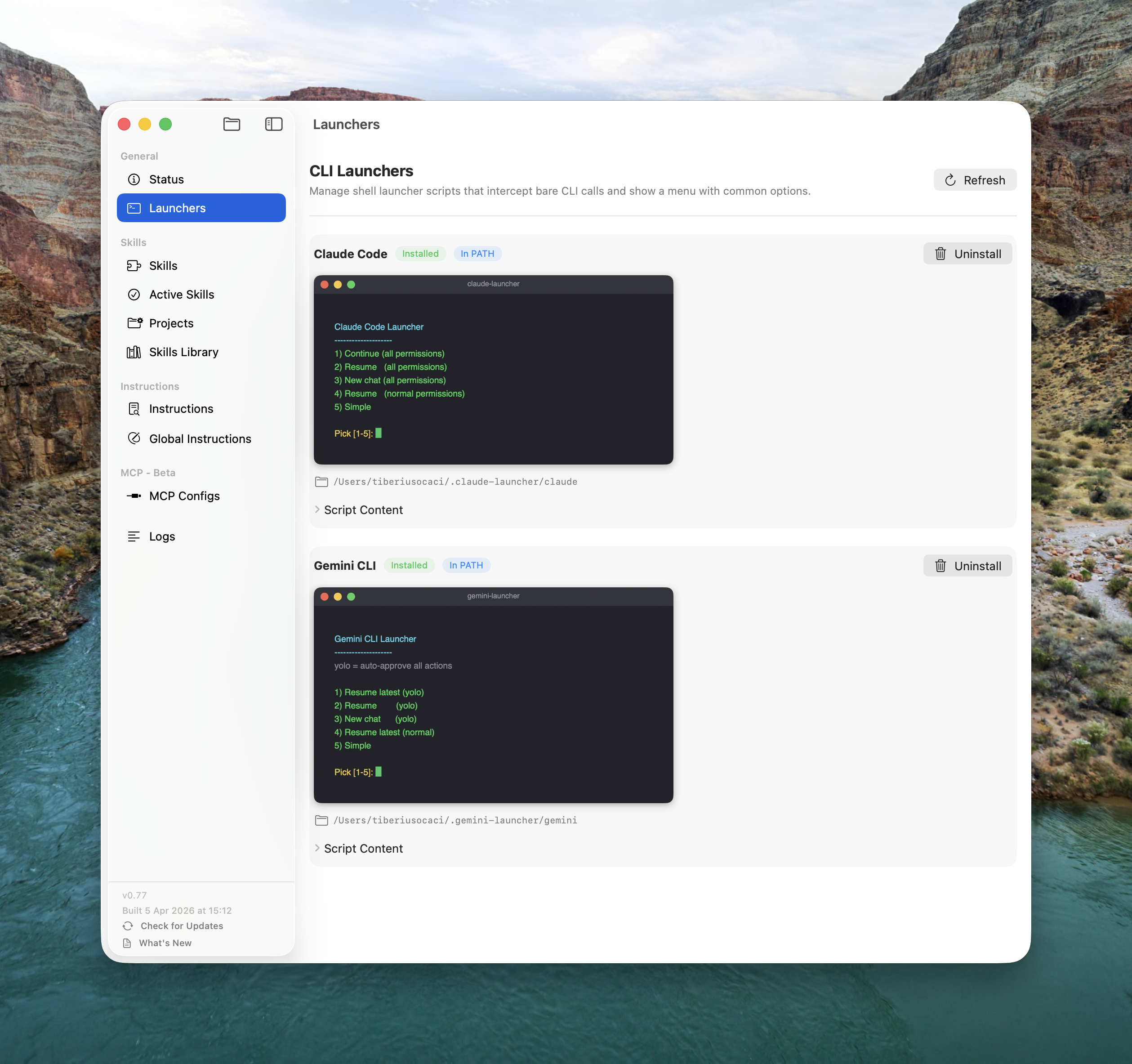
Shell wrapper scripts that intercept bare claude or gemini commands and present a quick menu — so you never type claude --continue --dangerously-skip-permissions again.
In most teams, AI skills are ad hoc. One developer has a lead-qualifier skill that took hours to refine. Another has a code-review skill no one else knows exists. A third added a CLAUDE.md that contradicts what everyone else has.
Skills are institutional knowledge. When they live on one machine, that knowledge is invisible to the rest of the team. The AI Agents Manager solves this with a GitHub-backed team skills library — a private or public repo that becomes the single source of truth for every skill your team uses.
Organise skills as folders in the repo — one folder per skill, just like ~/.agents/available_skills/ on your machine. Each skill has its own SKILL.md, scripts, and assets. The repo is the canonical version of every skill your team owns.
In the Skills Library view, click Add Source and paste your repo slug — your-org/ai-skills or the full path to a subfolder. For private repos, add a GitHub personal access token with repo:read scope. The token is stored locally and never leaves your machine.
The Skills Library shows each skill's install status: Not Installed, Up to Date, or Update Available. New team members open the app, add the repo as a source, and install everything with one click. No Slack threads. No shared drives. No "which version do you have?"
When you improve a skill, push the changes to the repo. Every team member's Skills Library shows an Update Available badge. One click on Update All and they're in sync. No version drift. No "I thought you updated that". The SHA of every installed skill is tracked locally so the app knows exactly what changed.
Add a GitHub personal access token for private team repositories. Tokens are stored locally in the app — never sent to any server.
Add several repos as sources — an official company library, a personal collection, and an open-source community pack. Each skill shows which source it came from.
Skills are downloaded recursively — all files, subfolders, scripts, and assets. The same structure as the repo lands in ~/.agents/available_skills/.
The app compares the local tree SHA against the remote. If a single file changed, the skill is marked as needing an update. No false positives. No missed updates.
Backup → Consolidate → Symlink in one operation. Moves all skills from every agent into the shared store, resolves conflicts via a UI modal (keep / replace / keep both), restores active links automatically.
Activate different skill subsets per project directory. A web project gets frontend-design while an infra project gets terraform-helper. Each agent sees exactly what it needs.
In-app editor for ~/.agents/agent.md. Cmd+S shortcut, modification tracking, footer enforcement badge — green checkmark if the mandatory footer is present, auto-appended on save.
Checks for new versions every 4 hours from a Railway-hosted endpoint. Downloads, shows a progress bar, replaces the app bundle, and relaunches. Dismissable per version — non-intrusive.
Color-coded log viewer for all sync operations. Levels: Header, Info, Success (green), Warning (yellow), Error (red). After any sync, a "View Logs" link shows the full output for debugging.
Every destructive operation — Skills Sync, Instructions Sync, MCP Sync — creates a timestamped backup first. Conflict resolution is explicit, never silent. No safe way to accidentally break your setup.
Skills, instructions, and MCP servers — managed in one place, synced to every agent on your machine. Install once. Everything stays in sync.
Download for macOSThe AI Agents Manager uses a two-folder system: ~/.agents/available_skills/ stores all your skills as real folders — your complete library. ~/.agents/skills/ contains only symlinks to the skills you want active right now. Each agent's own skills/ directory is symlinked here.
One click in the Active Skills view creates or removes a symlink. Every agent — Claude Code, Cursor, Windsurf, Cline, and more — sees the change immediately because they all read from the same shared directory. No file copying. No version drift.
The MCP Configs view shows a cross-reference matrix: every MCP server × every agent. Green checkmark = configured, dash = missing. One click on "Sync to All" adds missing servers to:
~/.claude.json~/.cursor/mcp.json~/.codeium/windsurf/mcp_config.json~/.gemini/settings.json~/.vscode/mcp.json~/.codex/config.tomlIt only adds — never overwrites or removes existing entries. Timestamped backups are created before any change.
Cursor reads agent instructions from .cursorrules or .cursor.md. Windsurf reads from .windsurfrules or .windsurf.md. Both tell the AI how to behave in your project — they're the same concept with different filenames.
The AI Agents Manager consolidates all 14+ instruction file formats (cursor rules, windsurf rules, CLAUDE.md, GEMINI.md, .clinerules, .roorules, AGENTS.md, and more) into a single ~/.agents/agent.md master document. Each agent's original file is then rewritten to redirect to the master — so you write instructions once and every agent follows them.
Claude Code MCP servers are configured in ~/.claude.json under the mcpServers key. The AI Agents Manager reads this file, displays all your MCP servers in a visual matrix, and lets you sync any server configuration from Claude Code to every other agent in one click.
It supports both stdio and http transport types. You can also toggle individual servers enabled/disabled per agent, or delete a server globally (with automatic backup first).
When an AI coding agent starts, it scans its skills/ directory and loads all skill metadata into its system prompt. With 50 skills loaded, you're burning thousands of tokens on skill descriptions before the agent reads your first message. This causes:
The solution: keep your full collection in available_skills/ but expose only 5–15 active skills via symlinks in skills/. The Active Skills toggle makes this a one-click operation per skill.
25+ agents are supported out of the box: Claude Code, Gemini CLI, Cursor, Windsurf, GitHub Copilot, Codex CLI, Cline, Roo Code, Continue.dev, Augment, Amazon Q, Tabnine, Aider, Junie (JetBrains), Devin, cagent, VS Code, Zed, and more — including sub-agents like Antigravity (nested under Gemini). New agents are added by editing a single array in the configuration.
Yes, the app is free to download and use. It is currently pending approval in the Apple Developer Program. In the meantime, you can install it directly via the install script: curl -fsSL https://makeitfuture.up.railway.app/install.sh | bash